
Advise your shoppers which size to order
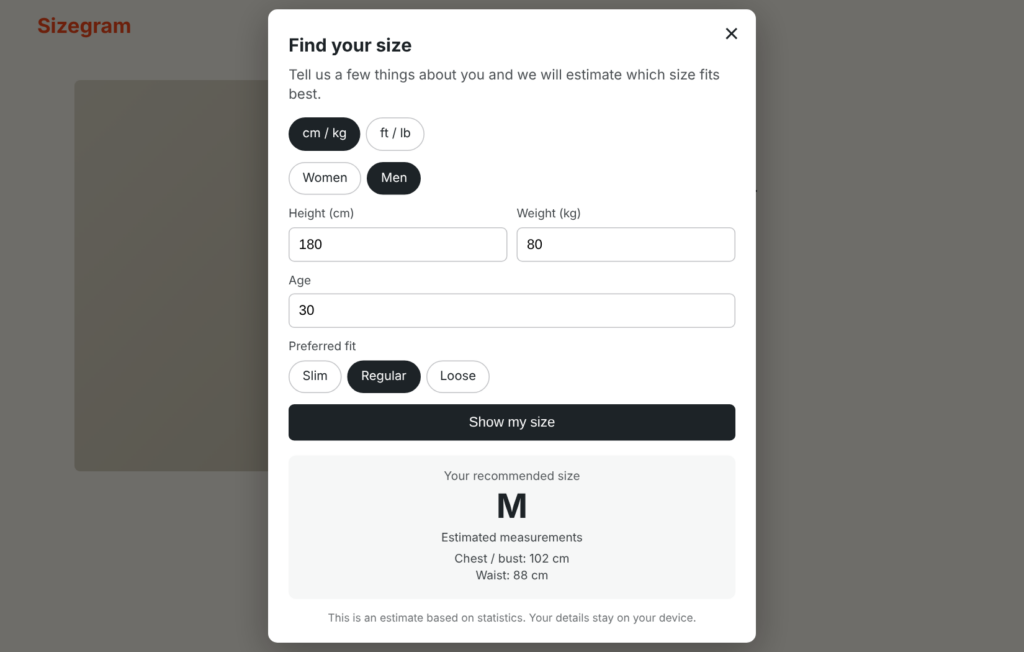
Sizegram Size Recommender adds a “Find my size” button to your WooCommerce products. Shoppers enter a few details and get a size advice based on your own size chart.
Pay once. No subscription. Add-on for the free Sizegram size chart plugin.
How it works
1. Shopper fills in 4 details
Height, weight, age and preferred fit (slim, regular or loose). It takes under 10 seconds.
2. We estimate the body
A statistical model estimates chest, waist, hip, inseam and more from those details. It runs in the shopper’s browser.
3. Matched to your chart
The estimate is compared with the size chart you already made in Sizegram. The shopper sees the best size, or the two sizes in between.
What you get
- Uses your existing size charts. Tick one box on a chart and link its columns to body measurements.
- Adults and children. Children’s charts are matched on height and age (years or months).
- Fit preference. Slim, regular or loose, with offsets you can set yourself.
- Classic and block themes. Choose the button position, or use the shortcode .
- Privacy friendly. No external service and no account. The shopper’s details stay on their device.
- Metric and imperial. Shoppers can switch between cm/kg and ft/lb.
Honest about accuracy
The recommender gives an estimate, not a guarantee. The body model is built on public measurements of about 6,000 adults (ANSUR II). Chest and waist are typically estimated within 3 to 5 cm; foot length within about 1 cm. That is enough to point most shoppers to the right size and to reduce size-related returns, and it always sits next to your full size chart.
Questions
Do I need the free Sizegram plugin?
Yes. The Size Recommender is an add-on that uses the size charts you make in the free Product Size Chart for WooCommerce plugin. You also need WordPress 6.0+, WooCommerce and PHP 7.4+.
Does it send my shoppers’ data anywhere?
No. The calculation runs in the shopper’s browser. Nothing is sent to Sizegram or to any other server.
Does it work for children’s clothing?
Yes. Set a chart to “Children” and link its columns to height and age. Shoppers enter their child’s height and age, and no body measurements are estimated.
Will it work with my theme?
It works with classic themes and with block themes (Full Site Editing). If you want full control over the position, use the shortcode .
How do I get the plugin after paying?
You download a zip file after checkout and upload it via Plugins > Add New > Upload Plugin. Updates are sent by download for now.